


Monitor the incorporation of new companies at Companies House and bring them directly into Salesforce.
Use Cases
Accountants and businesses selling services to newly incorporated companies need access to the very latest incorporation data.
Enabling Incorporation Monitoring in Reg.Direct allows you to receive newly incorporated company data in minutes – directly into your Salesforce org.
Salesforce Administrators can build simple flows to filter the records that you need – for example by SIC Code, City or Number of Directors – and allow those you don’t to automatically expire and be deleted.
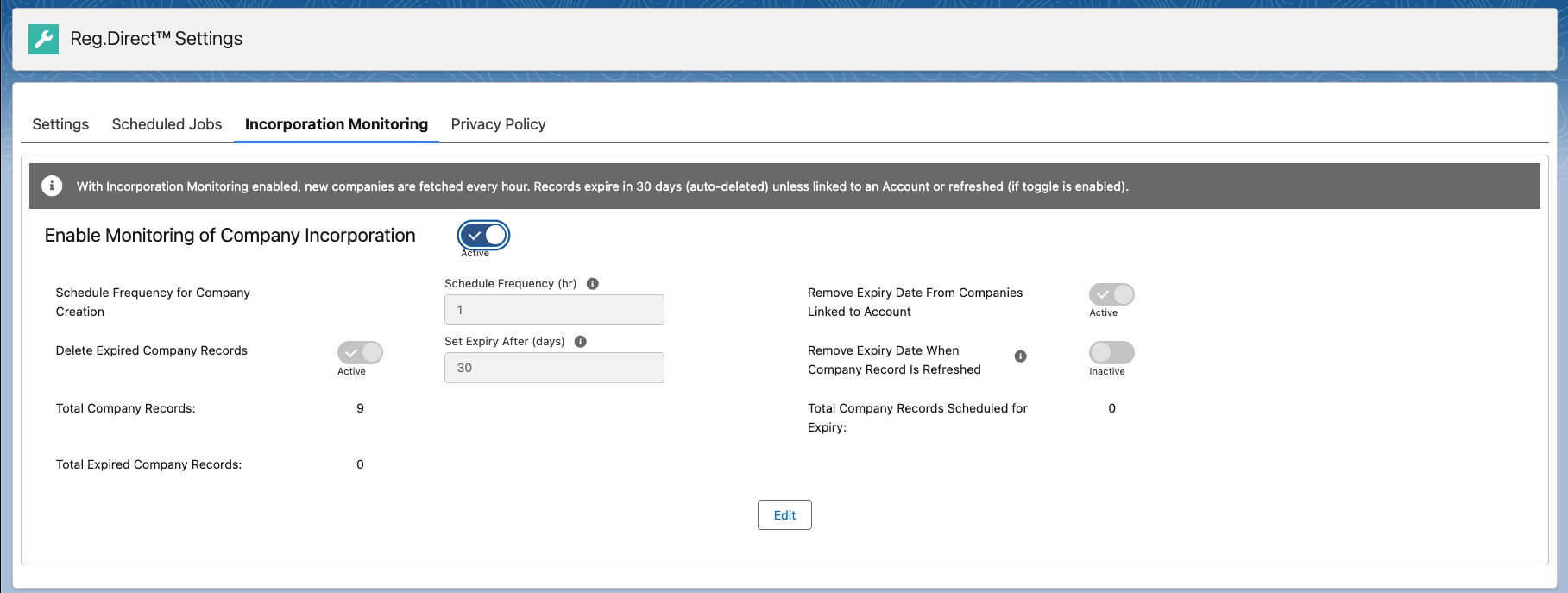
Enabling Incorporate Monitoring in Salesforce
UK Company Incorporation monitoring will create Company records in Salesforce for every newly incorporated company at Companies House.
- Visit the Incorporation Monitoring tab on the Reg.Direct Settings Page
- Move the slider next to Enable Monitoring of Company Incorporation to enable this feature.
After enabling the feature, the following settings are available to be configured. These provide mechanisms for you to control the length of time newly created Company records are retained in your org.
- Schedule Frequency for Company Creation is the frequency at which the integration will poll Companies House for information about newly incorporated companies. We recommend that this frequency is set between 1 and 4 hours to ensure that the amount of data collected by the background process is not excessive.
- Set Expiry Date (days) sets an ‘Expiry Date’ of today + X days on the newly incorporated Company record. This date is then used as criteria for removing unnecessary Company records.
- Remove Expiry Date from Companies Linked to Account will automatically remove the Expiry Date from any newly incorporated Company record that is subsequently populated in the Company lookup field on an Account record. (The effect of this is to prevent the Company record being deleted – see below.)
- Remove Expiry Date when Company record is Refreshed will automatically remove the Expiry Date from any newly incorporated Company record that is subsequently automatically or manually updated by a sync operation.
- Delete Expired Company Records slider enables a background process to regularly delete any Company records that have an Expiry Date and where that date is the current day or in the past.
The Company counters show
- the total number of Company records in Salesforce,
- the number of these records that have an expiry date, but are not yet expired
- the number of Company records with an expiry date that is in the past (that would be removed by enabling the Delete Expired Company Records setting)