


Having installed Reg.Direct and updated your Lightning Record Pages so that you can see company data, the app can be configured to automatically update fields on Account and Company records with data from Companies House with a background sync.
There is a highly granular control on the Reg.Direct settings page that allows you to control the frequency of call-outs to Companies House.
This is important as Companies House have precise limits to work within and the configuration controls in Reg.Direct are designed to spread usage of the API throughout the day and minimise the risk of high peaks.
Settings Page | Settings Section
This section allows you to control the behaviour whilst sync’ing data from Companies House to Salesforce using your own API key.
If you wish to use the Limited Feature Key (i.e. Reg.Direct’s built-in key), you will not be able to adjust any sync settings and will be subject to limits.
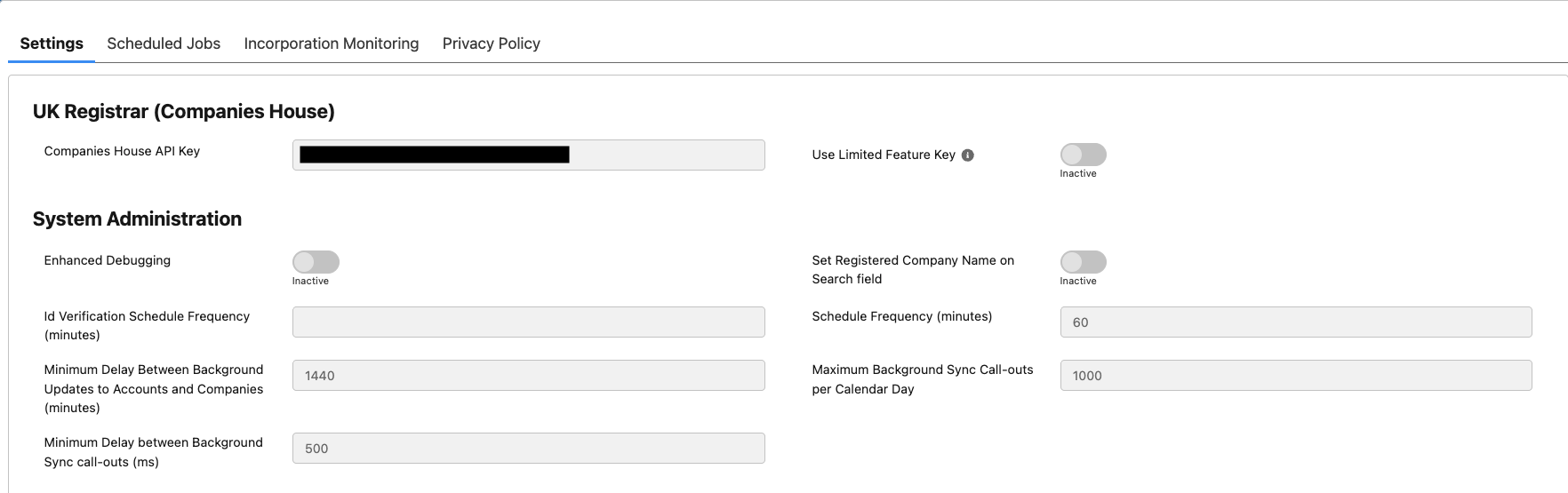
- Enhanced Debugging should ordinarily be switched off and only enabled under the direction of Reg.Direct Support team.
- Id Verification Schedule Frequency (minutes) determines how frequently Reg.Direct collects updated Verification data from Officers and PSCs. The recommendation is to set this to between 60 and 1440 minutes (1hr – 24hrs).
- Minimum Delay Between Background Update to Accounts (minutes) After a background sync has been completed for an Account or Company, automatically populate the next update time to be this number of minutes after the sync has taken place. 10800 = 10800 minutes = 180 hours = 7.5 days.
- Minimum Delay between Background Sync call-outs is the minimum length of time that the background sync process will wait between making consecutive call-outs to Companies House. This is set to reduce the risk of hitting Companies House API Throttling limits.
- Schedule Frequency: How frequently the background batch process will check if the Companies House information on an Account needs to be updated. 60 = 60 minutes = the app will check every hour. Note that this is a CHECK, not the actual update.
- Maximum Background Sync call-outs per calendar day: Controls the maximum number of sync call-outs that will be made in a calendar day, to allow you to manage the app within your salesforce call-out limits. Note that manual call-outs are not considered.
Settings Page | Scheduled Jobs Section
This section allows you to enable, disable and manually run background sync jobs.
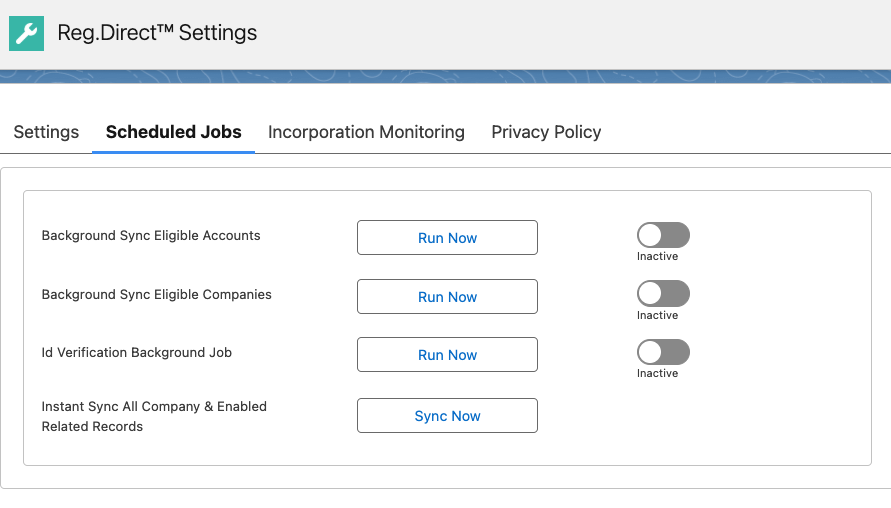
- Background Sync Eligible Accounts will refresh company data on Account records according to the schedules defined on the main Settings page and where records meet the criteria for updates.
- Background Sync Eligible Companies will refresh company data on Company record according to the schedules defined on the main Settings page for records that meet the criteria for updates. This will also include Officer, PSC, Charges and Prior Name data if enabled.
- Id Verification Background Job will refresh identity verification data on Officer and PSC records according to the schedules defined on the main Settings page
- Instantly Sync All Company & Enabled Related Records will ignore the frequency schedules on the Settings page and perform a one-time sync of company information on all Company records and Officer, PSC, Charges and Prior Name records if enabled.
How the Companies House Data Sync with Salesforce process works
- There is a check-box on Account and Company called ‘Reg.Direct Sync Now’. You can use Flows and/or any other Salesforce automation to check this checkbox to have the Companies House data fields automatically updated.
- If you would like the sync to happen automatically without creating automation yourself, or to minimise the risk of hitting Companies House API Throttling limits, simply configure the settings on the Reg.Direct Settings page as outlined above, ensuring that you check the Enable Sync checkbox.
- Now, on an Account or Company record, select ‘Enabled’ in the Reg.Direct Background Sync picklist and the Companies House data will automatically update according to the schedule on the Reg.Direct Settings page.
Best Practices
- Do not bulk update all your Account or Company records and trigger them update from Companies House at the same time. This risks exceeding your Companies House API limit or Salesforce Governor limit.